





Are you ready to apply for the Bihar Police ASI Technical Vacancy 2026? If you have completed your polytechnic diploma and want a permanent government job, this 22-vacancy opportunity is huge. However, every single year, thousands of brilliant students get rejected before the exam even starts. Why? Because they make silly mistakes in their online application form.
The Bihar Police Sub-Ordinate Services Commission (BPSSC) is extremely strict. If your photo is blurry, if your signature is the wrong size, or if your name doesn’t perfectly match your 10th-grade certificate, your form will be thrown out. There is no edit window once you submit!
Don’t worry. I have analyzed the official PDF word-by-word. Think of this guide as your personal mentor. I will walk you through exactly How to Apply for Bihar Police ASI Technical 2026, from opening the website to printing your final receipt. Take a deep breath, read this carefully, and let’s get your form filled with 100% accuracy.
Also read Bihar Police ASI Technical Vacancy 2026 – Apply Online for 22 Posts | Last Date 21 June
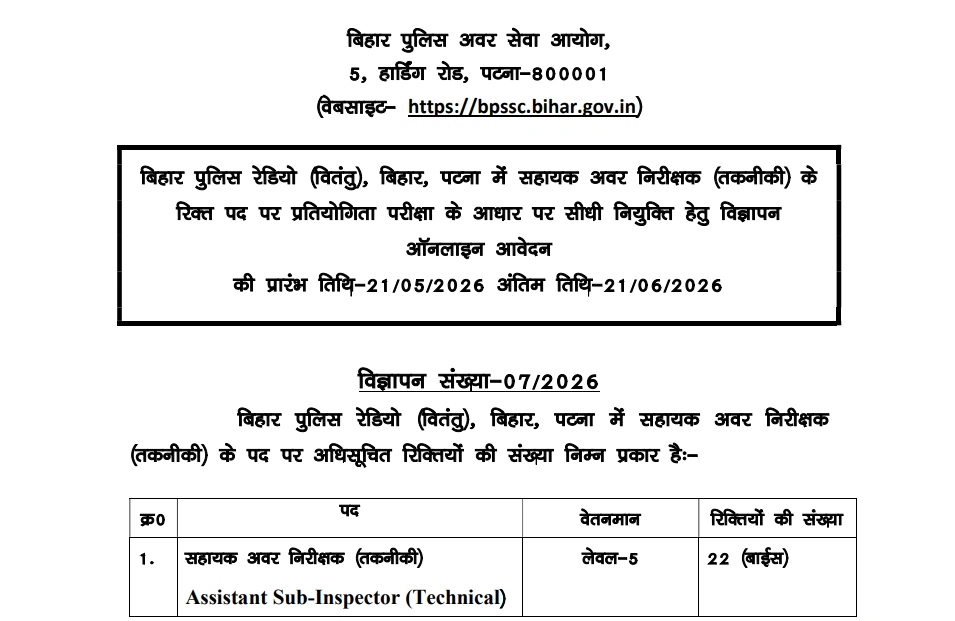
Phase 1: The Pre-Application Checklist (Do Not Skip)
Before you even touch your keyboard or open the official website, you must gather your documents. If you try to find these while filling out the form, your session will time out, and you will have to start over.
Keep these items on your desk right now:
- 10th Class (Matriculation) Certificate: This is the holy grail. Your name, father’s name, and Date of Birth must be entered exactly as printed here. No prefixes like Mr., Mrs., Shri, or Dr. are allowed.
- Active Mobile Number: This must be your personal number, or a family member’s. BPSSC will send your Registration ID, passwords, and Admit Card alerts here. Do not use a cyber cafe owner’s number.
- Active Email ID: Similar to the mobile number, all future communications, including document verification schedules, will be mailed here.
- Diploma Marksheet & Certificate: You need to enter your passing date and certificate number. Remember, the cut-off date for passing is August 1, 2025.
- Category/Caste Certificate: If you are claiming SC/ST/BC/EBC or EWS reservation, keep the certificate number and date of issue handy.
- Domicile Certificate: Only Bihar residents get reservation benefits. If you are from outside Bihar, you apply as General (Unreserved).
- A Valid Photo ID: Aadhaar Card, Voter ID, PAN Card, Driving License, or Passport. You will need to enter the ID number in the form.
Phase 2: Photograph and Signature Rules (Crucial)
This is where 80% of rejections happen. The BPSSC software will automatically reject your application if your images do not meet the exact pixel and file size requirements. Prepare these files on your computer before starting.
1. Passport Size Photograph Rules
- Background: Must be a plain White background. Do not use blue or any dark colors.
- Age of Photo: It must be taken within the last 2 months.
- Face Coverage: Your face should cover 70-80% of the photo. Both ears must be clearly visible.
- Accessories: No sunglasses, no dark tinted glasses, and no caps/hats. Normal spectacles are allowed but ensure there is no flash reflection on the lenses.
- File Size: Between 15 KB and 25 KB.
- Format: .JPG or .JPEG only.
2. Signature Rules (Hindi & English)
- You must upload TWO separate signatures: one in English and one in Hindi.
- Ink Color: Use a Black or Blue ballpoint pen.
- Paper: Sign on a completely plain white unruled paper.
- File Size: Between 15 KB and 25 KB for each signature.
- Format: .JPG or .JPEG only.
- Pro Tip: Do not write your signature in ALL CAPITAL LETTERS. It will be rejected. Sign normally.
Phase 3: The 3-Step Online Application Process
The entire application process is divided into three distinct steps on the official BPSSC portal (bpssc.bihar.gov.in). Follow this order strictly.
Step 1: Registration and Fee Payment
Unlike other exams where you pay at the end, BPSSC requires you to pay the fee first to generate a registration number.
- Visit the Official Site: Go to
bpssc.bihar.gov.inand click on the “Bihar Police” tab. - Find the Link: Click on “Apply Online for the post of ASI Technical (Advt. 07/2026)”.
- Read Instructions: A page with Hindi/English instructions will appear. Scroll to the bottom, check the declaration box, and click “Proceed to Registration & Payment”.
- Enter Basic Details:
- Applicant Name (First, Middle, Last).
- Nationality (Indian).
- Applicant Mobile Number and Email Address.
- Are you a domicile of Bihar? (Yes/No).
- Select your Category (General/EWS/EBC/BC/SC/ST).
- Select Gender and Date of Birth.
- Are you a Bihar Govt Employee or Ex-Serviceman? (Yes/No).
- Payment Gateway: Click on “Proceed”. The screen will show your basic details and the fee amount (₹100 for all candidates).
- Pay the Fee: Use UPI, Net Banking, or a Debit/Credit Card. Once the payment is successful, do not refresh the page. Wait for it to redirect.
- Registration ID: A screen will pop up saying “Your Registration is Successful.” It will display your unique Registration ID. Write this down immediately and take a screenshot. You will also get an SMS.
Step 2: Filling the Main Application Form
Now that you are registered, you can fill in your detailed educational and personal data.
- Click on “Proceed to Fill Application Form”.
- Enter Father’s & Mother’s Name: Exactly as per the 10th certificate.
- Marital Status & Aadhar Number: Enter these accurately.
- Identification Mark: You must provide one visible identification mark (e.g., “A mole on the right cheek” or “A cut mark on the left forehead”).
- Educational Qualification Section:
- Matriculation (10th): Enter your Board/University Name (e.g., BSEB Patna, CBSE), passing certificate number, and exact date of issue.
- Diploma: Enter your Institute Name, your specific branch (Electronics, IT, etc.), passing certificate number, and the exact date of issue. (Remember, this date must be before 01-Aug-2025).
- Address Section:
- Enter your Permanent Address and Correspondence Address. If both are the same, just tick the “Same as Permanent Address” box.
- Declaration of Criminal Cases:
- The form will ask yes/no questions about whether you have ever been arrested, convicted, or debarred by any commission. Answer truthfully. Hiding a criminal record will lead to immediate termination later.
Step 3: Uploading Documents & Final Submission
- Upload the Photo: Click on the photo upload section and select your resized white-background photo. The preview should be crystal clear.
- Upload English Signature: Select your English signature image.
- Upload Hindi Signature: Select your Hindi signature image.
- The “Preview” Button: Click “Proceed”. This is the most critical moment of the entire process. The screen will show every single detail you have typed and the images you uploaded.
- Verify Everything: Read every spelling letter by letter. Match your date of birth with your certificate. Check if the Hindi and English signatures are swapped by mistake (a very common error!).
- Final Submit: Once you are 100% sure, check the declaration box, enter the security CAPTCHA code, and click “Submit Application”.
- Print Acknowledgement: The screen will generate a final Acknowledgement Page with a barcode. Download this as a PDF and print a hard copy. You will strictly need this printed copy during the document verification phase after the physical test.
Emergency Section: What If I Made a Mistake?
We are humans, and sometimes mistakes happen. What if you submitted the form and suddenly realized you entered the wrong date of birth or uploaded the wrong photo?
BPSSC Rule: There is NO edit or correction window. Once submitted, the data is locked.
The Solution (Cancellation Process):
- Log in again using your Registration ID and Mobile Number.
- You will see an option in red: “Cancel Registration Form”.
- Click it. It will ask for confirmation.
- Warning: Once cancelled, your original application is permanently deleted, and your ₹100 fee is gone. It will not be refunded.
- You must now start from Step 1, register as a new candidate, pay the ₹100 fee again, and fill the form accurately.
- Note: You can only cancel before the final application closing date (21 June 2026).
Top 5 Reasons Forms Get Rejected (Avoid These!)
As a recruitment expert, I have seen thousands of tears over rejected forms. Do not let this happen to you. Avoid these fatal errors:
- Fake Certificates: Uploading or entering details of a diploma that completes after the August 1, 2025 cut-off date.
- Duplicate Applications: Never fill out two separate forms with slightly different details hoping one will get accepted. Both will be tracked via Aadhar/Name matching and permanently rejected.
- Payment Failure Glitches: If your money gets deducted but the registration ID is not generated, do not panic. Wait 24-48 hours for the bank to settle. If it fails, the money will bounce back to your account. You must attempt the payment again before the last date.
- Blurry Uploads: If the invigilator cannot recognize your face from the printed admit card photo during the exam, you will not be allowed inside the center.
- Wrong Category Selection: Selecting SC/ST/OBC to get age relaxation or lower merit cut-offs, but failing to produce a valid, state-authorized certificate during verification will lead to outright disqualification.
Also read Bihar Police ASI Technical Vacancy 2026 – Apply Online for 22 Posts | Last Date 21 June
Important Links (Apply Here)
Here are the direct official links you need.
| Link Description | Click Here |
| Apply Online for Bihar Police ASI Technical Vacancy 2026 | Click Here to Apply for Bihar Police ASI Technical Vacancy 2026 |
| Download Recruitment Notification PDF | Download Official PDF of Bihar Police ASI Technical Vacancy 2026 |
| Official BPSSC Website | Visit Official Website |
| Join our whatsapp Channel | Join whatsapp Channel |
| Follow Our Facebook Page | Fb page |
| Our Youtube channel | Youtube channel |
| Our Telegram Channel | Telegram Channel |
| Our Instagram page | Instagram page |
| Follow Our X Page | Join Our X Page |
| Our Official Website Find more jobs | Job Shikhar |
| Our Age Calculation Tools | Click here for Job Shikhar Age Calculation Tools |
| Our Salary Calculations Tools | Click here for Job Shikhar Salary Calculation Tools |
| Our Photo Resizer Tools | Click here for Job Shikhar Age Photo Resizer Tools |
| Our AI Tools Website | Agentive Tech |
Frequently Asked Questions (Application Process)
Q1: Can I fill out the application form on my mobile phone?
Yes, you can apply using a smartphone. However, resizing photos to exactly 15-25 KB and uploading them is often difficult on mobile browsers. It is highly recommended to use a laptop or desktop computer to avoid formatting errors.
Q2: What happens if my internet disconnects while paying the fee?
If the internet drops during the payment gateway process, check your bank account. If money was deducted but no Registration ID was sent via SMS, wait 24 hours. If it doesn’t update, the transaction failed, and the money will be refunded within 7 working days. You will need to initiate a new payment.
Q3: I am from Uttar Pradesh. Do I need a caste certificate?
No. All candidates from outside Bihar, regardless of their actual caste in their home state, must apply under the Unreserved (General) category. You do not need to upload any caste certificate.
Q4: My diploma result is out, but I don’t have the final certificate yet. What should I do?
You can enter the passing date mentioned on your final semester internet marksheet or provisional certificate, provided that date is on or before August 1, 2025. Ensure you obtain the original certificate before the physical document verification stage.
Q5: Is there any offline form submission method?
No. The Bihar Police ASI Technical Recruitment form is strictly 100% online. No hard copies sent via post or courier to the BPSSC office will be accepted.
Final Advice: The deadline is June 21, 2026. Do not wait for the last 3 days! The BPSSC servers handle massive traffic from all over Bihar, and the website frequently crashes or slows down near the deadline. Grab your documents, resize your photos today, and secure your chance at this brilliant career opportunity. Good luck!